Squadroom
Squadroom runs teams of coding agents. Claude Code, Codex, Gemini CLI, Grok Build, Kimi Code and OpenCode agents can sit in the same team, each with a role, and they work through the job together: they message each other, hand work back and forth and review each other's changes. They come back to you only when they need a decision.
Work is split into projects, usually one per repo, and tabs, one per piece of work such as a feature or a review. Each tab has its own team and its own spend limit, and tabs run side by side. An agent can propose a new tab with a team of its own, and it's created once you approve it. Squadroom runs on your own machine and works from a phone too. macOS today; Linux and Windows next.
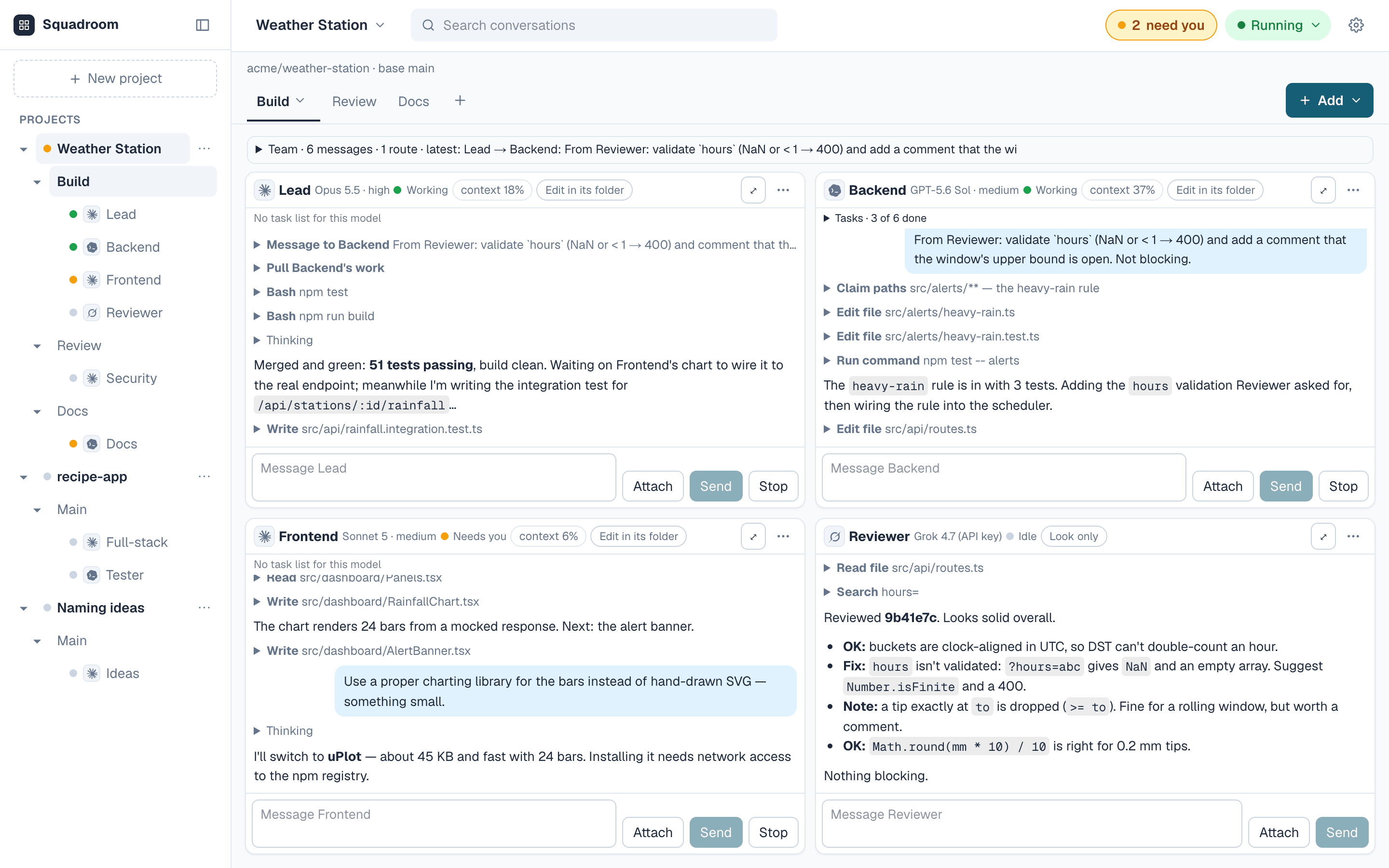
How the agents work together
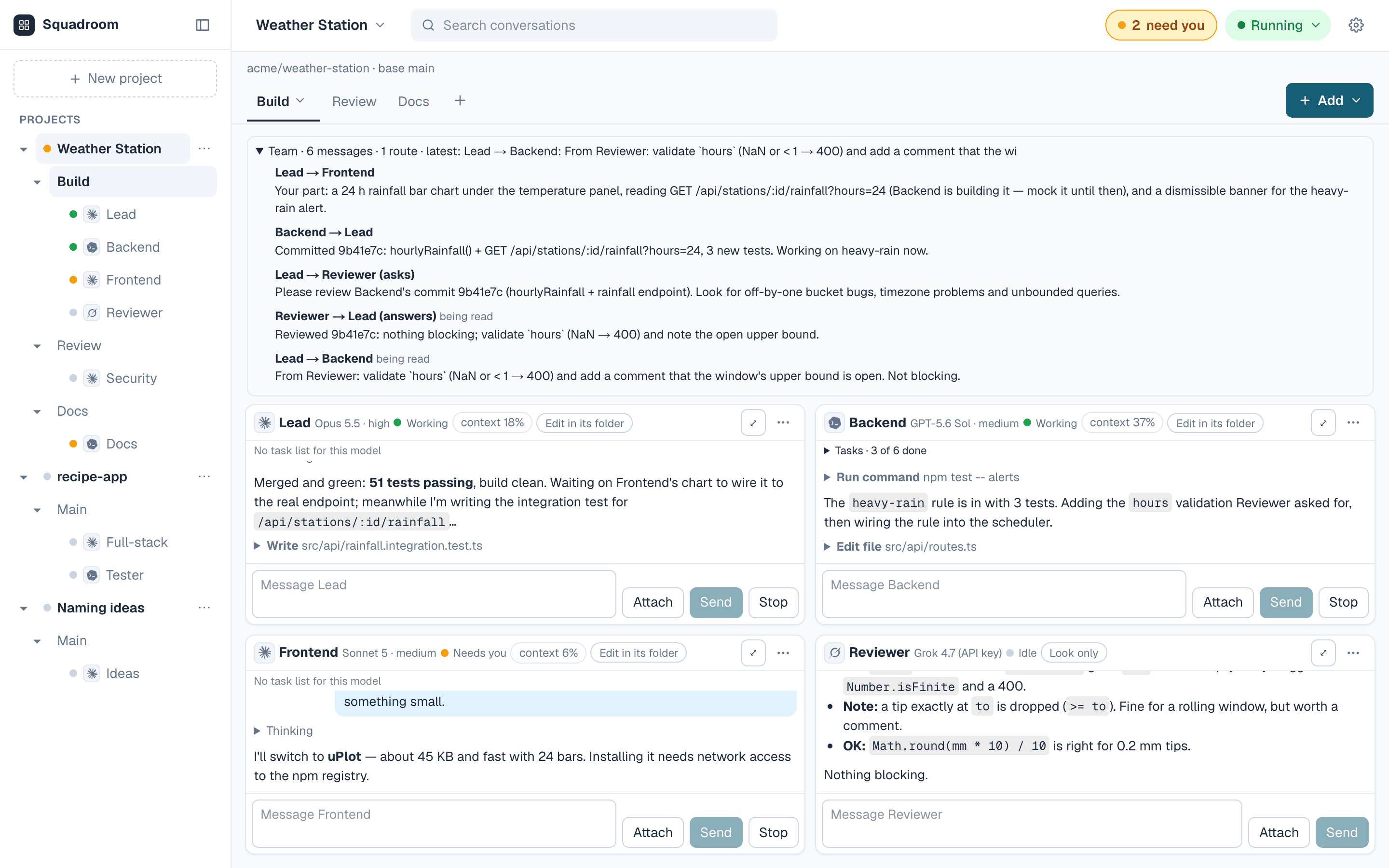
Agents talk to each other directly. One can send another a message, ask it a question and wait for the answer, pull in its changes, or claim the files it's about to edit so nobody else touches them. A message waits until the other agent has finished its current reply, then arrives as its next prompt.
Some hand-offs need no message at all. A route says, for example, that whenever the Lead ends a reply with "ready for review", that reply goes straight to the Reviewer.
A job starts with one message. In a team it goes to the Orchestrator, which splits the job up and hands out the parts. In a pair it goes to the Pair Lead, which has the Reviewer check its work before reporting back. Any agent's window still takes a message at any time.
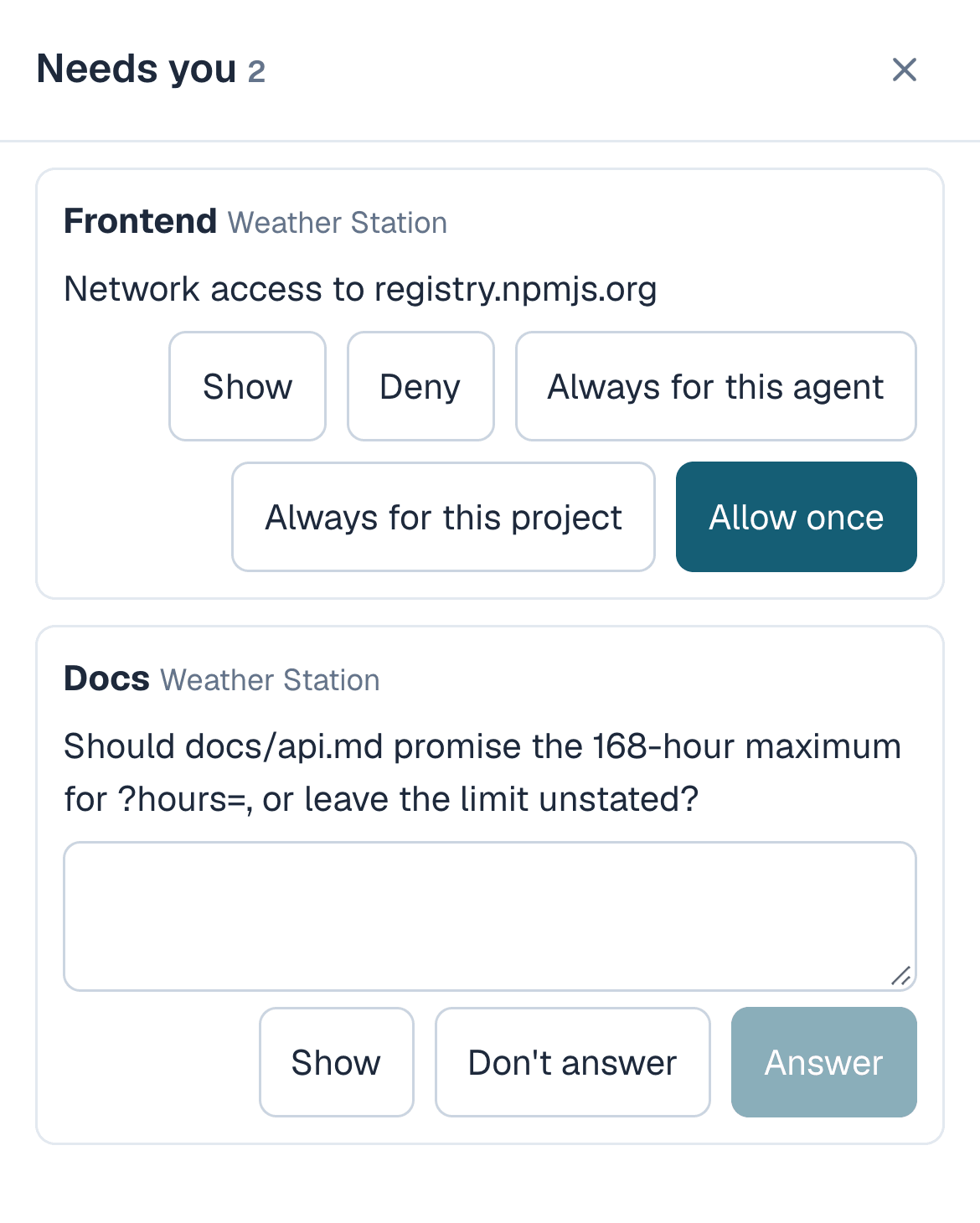
Anything that needs a human decision, such as a question, a request to reach a website, a branch ready to push or a proposal for a new tab, lands in one list called Needs you, across every project. The Team panel shows every message the agents have sent each other.
A permission request closes when the agent's reply ends, for example at a time limit while you were away. It stays in Needs you, marked "got no answer". You can allow it for next time, have the agent ask again, or dismiss it.
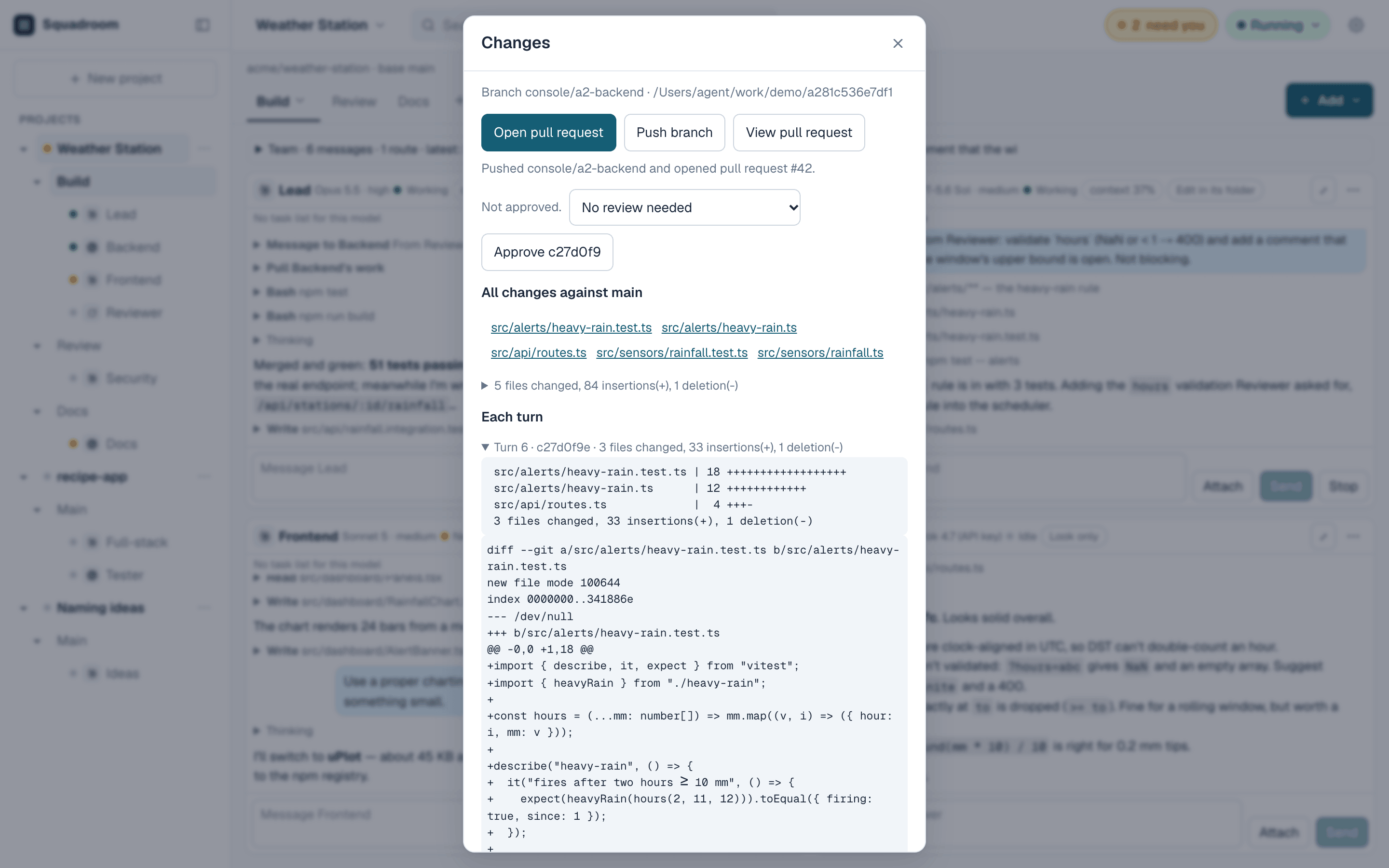
Branches and pull requests
Every agent works in its own copy of the repo, on its own branch. Each time an agent finishes a reply, Squadroom commits whatever it changed, so the history reads one reply at a time. In a GitHub project the commits carry your GitHub no-reply address, so GitHub and anything that deploys from it treat them as yours.
An agent's copy is made once and doesn't update from GitHub by itself. When the base branch gets new commits there, the agent's window says so, for example "main has new commits", and the agent is told with its next message. It then merges them into its branch itself.
Nothing goes to GitHub until it's approved, either once or for good for that agent. Squadroom then pushes the branch and opens the pull request.
An agent can read the GitHub Actions results for its pull request, and the end of a failing job's log. Tests that can't run inside the sandbox, such as Firefox and WebKit browser tests, can run on GitHub instead, and the agent works from the result. The GitHub token needs Actions: Read-only for this.
Roles
A role is a named prompt that sets an agent's job and how it works with the rest of the squad. Eight are built in.
Every role has one of two access levels. Code edit changes files in the agent's own copy of the repo. Code analysis reads code, runs commands and messages the others, with no file changes.
A custom role has a name, a one-line description, an access level, a suggested agent (Claude Code or Codex) and a prompt of up to 3,500 characters. Choosing a role fills in its access, suggested agent and prompt; vendor and model are picked for each agent. Built-in prompts can be rewritten and reset, and any single agent's prompt can be overridden without changing its role.
- OrchestratorCode analysis
Splits the goal into parts, hands them out and gets them reviewed.
- PlannerCode analysis
Writes a short ordered plan with a check for each part.
- ArchitectCode analysis
Sets modules and interfaces up front and checks commits against them.
- LeadCode edit
Builds its assigned area and reports back.
- Pair LeadCode edit
Takes requests directly and has a Reviewer check the work before reporting.
- DesignerCode edit
Handles layout, styling and accessibility in its area.
- ReviewerCode analysis
Reads commits and reports problems, most serious first.
- TesterCode edit
Writes and runs tests and gives the exact command for each failure.
Projects, tabs and squads
A project is a GitHub repo, a new local folder, or no files at all for agents that only discuss. Its tabs run concurrently; one might hold a feature, another a security review, another the docs.
A squad can be one agent, a pair, or an Orchestrator with up to seven others. Each agent has its own name, model, access level and, where the model has one, thinking level. The model and thinking level can be changed later: the model name in the agent window's header opens a list of both. A choice is saved at once and applies from the agent's next reply.
An agent can propose a new tab with its own squad. It gives the tab a name, a goal and the members it wants, and the proposal appears in Needs you. There you create it as proposed, edit the team first, or decline. Nothing is created without your approval, and there's no cap on how many tabs an agent can propose.
The agent that proposed the tab is told what you decided. It and the new tab's lead can message each other across the two tabs, and when the new tab's work is done its result goes back to the agent that proposed it.
Agents
Each agent runs on your own subscription or API key, at Code edit or Code analysis.
Claude Code agents with Code edit can generate images with Krea,
turned on per project. An image costs $0.015 to $0.065, charged to
the tab; one reply can make at most 8 images and spend at most $1.
Images are saved to design/ and committed with the reply.
- Claude CodeClaude plan, or an Anthropic API key through its "(API key)" models.
- CodexChatGPT login, or an OpenAI API key through its "(API key)" models.
- Grok BuildxAI API key.
- Gemini CLIGemini API key.
- Kimi CodeKimi Code membership.
- OpenCodeAn API key for its model: GPT-5.6 Luna, Claude Haiku 4.5, DeepSeek V4 Pro or V4.1 Flash, Kimi K3, GLM-5.3 or GLM-5.3-Flash, or Qwen 3.8 Max via OpenRouter. Needs the project's network on.
Spend limits
Agents on a subscription (Claude plan, ChatGPT login, Kimi Code membership) cost nothing extra. Metered API keys have two limits.
Per tab. Each tab has a spend limit, $5 by default. A tab that reaches it pauses until Reset spend, which needs an e-mailed code. Cost comes from each reply's reported usage; a reply whose usage can't be read is charged the most it could have cost and pauses the tab.
Per key, at the provider. Every paid key needs a monthly cap set at the provider and entered with the key; no key is handed to an agent until then. The provider's cap is the hard ceiling, since Squadroom's own figures are estimates.
Up to six agents work at once, three per account or key; the rest wait their turn. The Overview page shows this month's spend per tab and per key.
Safety
Coding agents run commands and can be steered by anything they read.
Known limits: all agents run as the same OS user, so a running agent can read another running agent's environment, keys included. Treat every key as readable by all agents and cap paid keys at the provider. Approved network access is real access. Squadroom is meant for one person on their own machine. Architecture has the details.
- Separate OS userAgents run as a hidden
agentuser that can't read your home folder. - One copy per agentEach agent writes only inside its own copy of the repo. Claude Code and Codex run in their own sandboxes; Grok Build, Gemini CLI, Kimi Code and OpenCode run inside the launcher's macOS sandbox profile.
- Network by approvalClaude Code and Codex ask per site, and an approval can be once, always for that agent, or always for the project. Each of their windows shows Network ask or Network auto in its header, and a click switches it. On Auto the agent reaches any website without asking, so it could send anything it can read to any site. Grok Build, Gemini CLI, Kimi Code and OpenCode have no network unless it is turned on for the project.
- No GitHub token for agentsSquadroom pushes for them, only to
console/branches, only in repos whose base branch is protected by a GitHub ruleset (no force push, deletion or direct push), and only after checking the push holds none of the keys it handed out. - Automatic pausesA tab pauses itself after 40 agent replies or 2 hours from one message. Those two limits are the defaults, and each tab can have its own under Turn limits in the tab's menu. A tab also pauses after 12 messages between two agents with no new commit. Resume continues it. A tab, a project or everything can be paused by hand at any time.
- RedactionHanded-out keys and common key formats are redacted from stored output. Other secrets an agent prints are stored as printed.
- Sign-inOnly your GitHub account, plus an e-mailed code when e-mail is configured. Changing keys, raising a limit, resetting spend, turning on network or image tools, or adding an "always" rule needs a code entered in the last 8 hours; without e-mail these actions are refused.
Templates and documents
A tab can be saved as a template with its agents, roles and routes, and a new tab can start from one.
The built-in Document review template takes a
project from brief to product backlog before any code is written.
A Lead on Claude Code writes each step's document in Markdown and
a Reviewer on Codex reviews it, the two passing drafts and findings
back and forth by routes. The steps are Brief, Design Principles,
an optional Detailed Design, Architecture with ADRs, Delivery Plan
and Product Backlog. Each step can change only its own files, its
document must be approved before the next step starts, and
decisions left for later go in parking-lot.md.
Any document workflow works the same way. A template can define its own steps, each with a name and the files it may change, and Document review can be copied and edited as a starting point. A step template keeps whatever team the tab has, from a pair to an Orchestrator with several writers and reviewers, and any agent can do the writing.
Files in each agent's menu lists the files in that agent's copy of the repo, Markdown first, and opens them formatted in the file panel. A document an agent has written can be read there before it's committed or pushed.
Setup
Requirements
- PlatformmacOS today; Linux and Windows next. About 10 GB of free disk.
- ToolsNode.js 24 and Git.
- sudo, onceFor the setup script, which creates the
agentuser and installs the agent CLIs and a small launcher. - https addressNeeded for sign-in and for phone access. Tailscale Serve works.
- GitHub tokenFor GitHub projects, a fine-grained token with Contents and Pull requests set to read and write. Add Actions: Read-only if agents should read check results.
- AccountsA GitHub OAuth app for sign-in, a Resend account for e-mailed codes (adding keys needs one), and accounts or keys for the agents in use.
Quick start
$ git clone https://github.com/squadroom/squadroom.git
$ cd squadroom && npm ci
$ sudo zsh scripts/console/setup-agent-user.sh
# Sign the agent user in to Claude Code and Codex (setup guide, step 4)
$ tailscale serve --bg 3011
$ cp .env.example .env.local
# Fill in the GitHub OAuth app, your GitHub ID and mail settings (step 6)
$ npm run build
$ npm run web -- --port 3011
# In a second terminal
$ npm run console:worker
Then open https://<address>/console, sign in
with GitHub and add keys on the Keys page. The
setup guide
has every step in full.